About a month ago, I switched from Telefonica to Vodafone because the former was starting to get expensive, 75 € / month for a 10 mbit/s link, and their uplink was only 300 kbit/s which is really annoying as I also upload stuff to my servers from time to time.
Anyway, so Vodafone sent me the following piece of hardware.
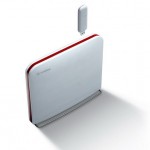
It’s an Huawei EchoLife HG553
At first, vodafone offer you to connect through their 3G network for free until the ADSL link is working. So far so good. Once the ADSL link was up, I switched to that.
But I experienced frequent problems with DNS queries, that is, from time to time I would get the famous “host not found” error, and from all my computers. I first thought that there was a problem with Vodafone’s DNSes so I changed them in my computers, but it didn’t work any better.
Strange! At the end I started to suspect that Vodafone might be filtering DNS requests on their network but I didn’t see why, as hosts like ‘mail.google.com’ or ‘mail.live.com’ failed all the time.
I called their (useless) hotline. They made me change the DNSes on my local machine, without results of course, then changed the DNSes in my router and rebooted it. Hum.. So they’re accessing the router eh? ‘mail.google.com’ resolved once after that.. Then it failed again. They seemed clueless about the problem. They also said something that got my attention: “when I’m pinging mail.google.com from your router, it works fine”.
All right.. How are they accessing the router? And most importantly how can they ping from it as the default web interface doesn’t allow you to do so.
I remembered I was once able to access the router through SSH using admin/admin. So I did that and to my surprise, it didn’t work! So they must have been tampering with my router since I got online?
So, after hacking around, this is how to solve the problem.
First, you need to reset your router to default settings. Turn it off, insert a pen into the ‘reset’ hole, turn it on, wait 10 seconds, turn it off, remove the pen.
Disconnect the ADSL link, you don’t want your modem to reconfigure itself and remove the admin account again. I’ll shortly explain how they do that.
Turn on the modem. Its IP is 192.168.0.1, the admin account’s login is ‘admin’ and its password is ‘admin’.
Go to the web interface using admin/admin then reconfigure what you need to. You’ll see that you have much more options available than with the vodafone/vodafone login. Don’t touch the ADSL stuff, it is preconfigured properly.
Here’s a list of a few stuff you might want to do:
- Advanced Setup/NAT: Enable UPnP. This is useful for Peer 2 Peer applications or stuff like MSN Messenger, Skype, VOIP or file transfert in chat programs
- Advanced Setup/DNS/Dynamic DNS. If you want to use services like dyndns.org to have your router available anywhere
- Important: if you don’t want vodafone to reconfigure your router and remove your admin access as soon as you go online, go to Management/SNMP Agent and Disable it
- Management/Access Control: Here you can disable vodafone’s ability to access your router from the WAN interface. Just turn off everything except ICMP on the WAN side, and enable everything for you on the LAN side
- Management/User Management: Change the password of your admin account. support is used by vodafone and the password is ‘support’ as well. Their access only works for telnet and ssh, not the web interface
Now do a SSH to the modem (with the admin account). If you need an SSH client for Windows, I can recommend PenguiNet.
Type the following:
iptables -t nat -D PREROUTING_IN 1
And that’s it! The DNS screw up is gone. Now make sure you configure your computers to use some other DNS than your routers because it is bugged and doesn’t work properly. You can use the vodafone DNSes:
89.6.239.4 212.145.4.98
You can now plug your phone line into the router’s ADSL port. If you disabled the SNMP services, the router won’t be reconfigured and rebooted by vodafone.
There’s still a caveheat, though. You’ll have to type the iptables command everytime you reboot your router. I’m trying to find a way to change it permanently.
I wonder if the vodafone support people realize how silly it is to tell users to change their DNSes when the router will intercept the queries anyway… Oh well.. Big corporations…
DNS problems came arrived 2 weeks ago. your investigation was very usefull for me ( I got the same router).
Just for the reseting part, I had to do a bit different, just unplug the DSL line, press the reset button until lights changed (around 15sec), switch off, switch on)
Now it looks like a pretty cool router (with full options and no “big brother” remote access)
thank’s a lot!!!!
Hi again,
I have a bypass that perhaps can help you. I made a script using “expect” commands that check DNS every X sec.
Expect allows you to send commands through ssh on machine we cannot configure rsa keys (like our router), it’s resolves the ssh password step .
I put it as a daemon on my server, it’s working fine.
if you are interested, send me a mail, and I will be happy to send you the script.
Regards.
I have the same router, and the same problem with DNS.
Remove the firewall rule works perfect!
But I managed to find out where the configuration of iptables, any progress on this?
I also have the same router and the same DNS problem. I have followed the instructions above to enable admin access but with no luck. I can’t login to the web interface as admin/admin nor telnet and ssh responds “ssh_exchange_identification: Connection closed by remote host”.
Any ideas anyone?
I have found something that seems to help me. The following 2 links have info on HG553 including what I was looking for:-
http://mail.google.com/mail/?shva=1#sent/124c3dc6583063eb
http://bandaancha.eu/foro/adsl-adsl2-vdsl/modem-routers/huawei-hg553
Sorry first link should be:
http://wiki.bandaancha.st/Acceder_a_la_web_de_administraci%C3%B3n_del_router_ADSL_Huawei_HG553_de_Vodafone_con_el_password_de_admin
Hi, thanks for the informations.
I have one question, if i will have admin access to the router i will have the ability to connect my printer in the router?
Thanks in advance.
I have just got the Vodafone Huawei EchoLife HG553, the software in the router is:
G553V100R001C03B
and hardware:
HG55MAGS
I have tried everything but i still the same Vodafone screen and have to put in “vodafone” as username & password, can someone please tell me how i get the vodafone rubbish out and re-set it to default
Thanks
Steve
The last 3 digit of the router software is 021 or 019? For example my router software is EchoLife_HG553V100R001C03B021
I too have “Vers. soft.: EchoLife_HG553V100R001C02B036”.
Tried all the above suggestions, to no avail. Reset did reset, but i cannot access. I do not have the chance to enter ID/pwd, I go staright to the index.
I can neither telnet nor SSH. Vodafone goes live in a few days & would like to fix it B4 I learn to hate it. I managed to have them ship 2 of these to me, any suggestion at all would be greatly appreciated, tks, Wm./
This is user manual published for Hg556 in ireland almost identical
http://forum.vodafone.ie/index.php?/topic/2235-huawei-hg556a-user-manual/
Hope this helps a little
It’s true, this method to reset Vodafone routers no longer works. Which makes this post completely invalid and should be updated or removed.
Although, as it is surrounded by Ads, I suppose the hits are quite beneficial 😉
I don’t know about the router issues, but WOW do i LOVE the title to this blog
Vodafone do suck. They are so uncustomer focussed it is incredible.
Awful customer service from an awful company
I switched from Eircom to Vodfone, and now find that I cannot use the wireless option. I have to go into the hall and plug directly into the router. How come I can only access the internet by plugging in directly but my wireless card can pick all the neighbours EIRCOM internet networks, and NOT my Vodafone router 5 feet away in the hall. !!!!
Hi, have done everything mentioned on here except the iptables (it kept coming back with an error) and i’ve found that as soon as the adsl is up and running i can no longer access the admin pages using the new password i set or the old one that i got in with originally 🙁 to set the adsl i have to enter http://adsl.vf in the browser and enter vodafone as the user then my password, have tried admin as the user but it comes back with a blank page, and when i was in the admin pages i could not find any link to enter the adsl user & password. Any ideas? software is spanish ver 021
hi,dos hg553’s dyndns working?
always can’t renew ip
my problem is “ppp down”, anyone can help me?
my problem is PPP down too
Hi .. I have the same problem .. ‘PPPDown’ after 1-2hr using this modem and keep going on like that (have to reboot the modem). Some people said that it is because of the ADSL still locked.
Does anybody have a solution for this ..?
I also have the same router and the same DNS problem. I have followed the instructions above to enable admin access but with no luck. I can’t login to the web interface as admin/admin nor telnet and ssh responds ssh_exchange_identification: Connection closed by remote hostâ€.
Any ideas anyone?
Tired of spanish vodafone changing the admin password when you connect the cable?
I am finally admin following this tutorial 😀
http://bandaancha.eu/tema/1673753/solucion-hg556a-sacar-passwords-admin-support#r1984802
A bit tricky but it works, up yours vodaphukk. 🙂
Huawei EchoLife HG553 fix
What a load of rubbish this router is vodafone.es. It drops out if multiple Ips are in use requiring very frequent power resets. The access to the router is still ok and diagnostics show ADSL is operational but nothing gets through to the Internet.
I have just received a replacement and its even worse.Vodafone must know this is a major issue !
However there is a fix !
By using a spare router you can bypass the faulty firmware.
Setup the spare router to use DHCP. Enable WIFI on spare router if required.
Access the crap Vodafone router and disable the DHCP option and WIFI. This forces the router into bridge mode.
Connect the spare router via a crossover network cable to one of the ports on the Vodafone router. Connect your local PC to any spare port on the spare router.
The spare router will now allocate all the DHCP IPs and operate without hanging the Vodafone router.
This appears to bypass the faulty firware.
Router problems still persist. Voadfone still try to insist that after 3 weeks the adsl service is activated. There is no solution to this router problem if you connect more than 1 pc to the external ports.
I used to be on Tele2 (Vodafone) for ADSL etc. Vodafone agent calls to advise that I need to switch to new Vodafone router as TELE2 no longer exists. I agreed and when new router arrived it would not work longer than 2 hours without a power reset. I struggled for days and called Vodafone support who advised that the dongle will work when ADSL is down. Power resets pursisted for more days.
After another 2 weeks I insisted on a new router which when delievered still was no good with frequent dropouts. In the end and over 100 resets I cancelled the contract. in writing, 2 faxes and requested a letter from them with a reference to the faults. They then sent me a letter with a fault ref that I inisted on regarding the fault and that Vodafone cannot fix the problem.
I received a small invoice which I paid for residual calls. I then cancelled the direct debit. Two months later a demand (not a factura arrives for 92 euros. I sent a letter plus all my previous incidents to them to say that the system never worked, contract is cancelled and I owe them nothing. One week later a demand arrives plus a referal to a credit collection agency plus letter from Equifax.
At this point I went to the Town hall to register a complaint with the Oficia de Consumidor. they completed the form and sent it to Vodafone who must respond within 9 days.
There is no way Vodafone can supply a poxy router, no service then insist its my fault. They had 2 months payments in good faith until I cancelled. They agreed that they could not find a solution but the accounting department even when advised ignore the faults. They have broke the contract of service not me. I will not pay this fee. Vodafone are a disgrace. It’s an Huawei EchoLife HG553 router and its got known problems. Vodafone have no alternative router and it stops working at random requiring power resets. They even refused to put me back on the Tele2 router that worked. Vodafone also reset the IP addresses overnight so you have problems because the router will not allocate you a new IP address on the DHCP. Router is totally screwed and Vodafone are trying to demand money for a service never provided.
Dont install the CD from Vodafone . Then use ip 192.168.1.1 password username both: advanced
Done its a free open router.
Hi, i just buy this Huawei EchoLife HG553.
My position is in Indonesia. So, the online shop didnt wrote anything about usb modem supported for this product and yes i’m so sure that this product will work with my huawei e-160 usb modem. But after i plug in the usb modem and go to admin router, username n pasword: admin, this router didnt detect my usb modem at all, it still blink green color on my usb modem. Nothing wrong with my usb modem coz i just buy this a month ago and normal internet surfing connected to my usb port laptop.
So does anyone know how to make my usb modem being “capture” / recoqnize to this router Huawei EchoLife HG553??
any positive respond are welcome. thank you zapek.